Friend Location: Phone Tracker
- 3.3
- Rating
- 500.00K
- Installs
- Free
- Price
 Analysis by App-foxy
My first impression of Friend Location: Phone Tracker is that it is built for a narrow, practical job: helping people who have agreed to share their whereabouts stay aware of one another. That is a different promise from finding the fastest route or exploring a map. I would consider it when a small group needs a shared point of reference, not when I want a full navigation suite.
How quickly can you get to the useful part?
The main task is easy to grasp: select trusted people, share a location, and use safety-related notifications as a prompt to check in. That focused flow should feel more direct than opening a general map app and trying to coordinate through separate messages. Still, I would not judge speed only by how quickly a screen appears. A location-sharing arrangement is useful only after the intended people are included and understand what the information means.
Before a journey or meetup, I would do a brief test while there is no pressure: confirm that the right contacts are part of the group, then ask one of them to check whether the shared information is visible. This small rehearsal is more valuable than assuming an invitation has completed the whole setup. It also lets the group settle expectations before anyone is waiting on an update.
You May Also Like

 Blood Strike: 2.5 Anniversary
Blood Strike’s Loadouts Turn Every Drop Into a Tactical Gamble
A close look at Blood Strike’s custom loadouts: how fast access to signature weapons reshapes its battle royale rhythm, rewards preparation, and narrows the gap between fights.

 Pandora - Music & Podcasts
Pandora’s Music Is Easy to Start, but Harder to Recover
Pandora’s strength is its low-effort path from a seed to a station. Its weak spot is how much confidence it asks you to place in connection, setup, and quiet recovery.

 8 Ball Pool
 Is Built on Rivalries, Rematches, and Routine
A close look at the rivalries, rematches, shared routines, and unanswered safety questions that turn a quick pool match into a persistent mobile community.

 Samsung Music
’s Quiet Strength Is Playing What You Already Own
Its reach comes less from spectacle than from dependable access to a personal library. That simplicity is both the app’s strongest retention engine and its ceiling.

 AccuWeather: Weather Radar
AccuWeather Review: A Quick, Clear Forecast for Everyday Decisions
For everyday plans, the best forecast is the one you can understand quickly. AccuWeather makes rain timing, radar, and local conditions easy to act on, with a few trade-offs.

 Hill Climb Racing
Why Hill Climb Racing Still Turns Crashes Into One More Run
A tiny car, a bumpy hill and one more upgrade: Hill Climb Racing keeps resurfacing because its simple chaos makes every near-miss feel personal.
More From Our News Desk



Useful when plans get busy
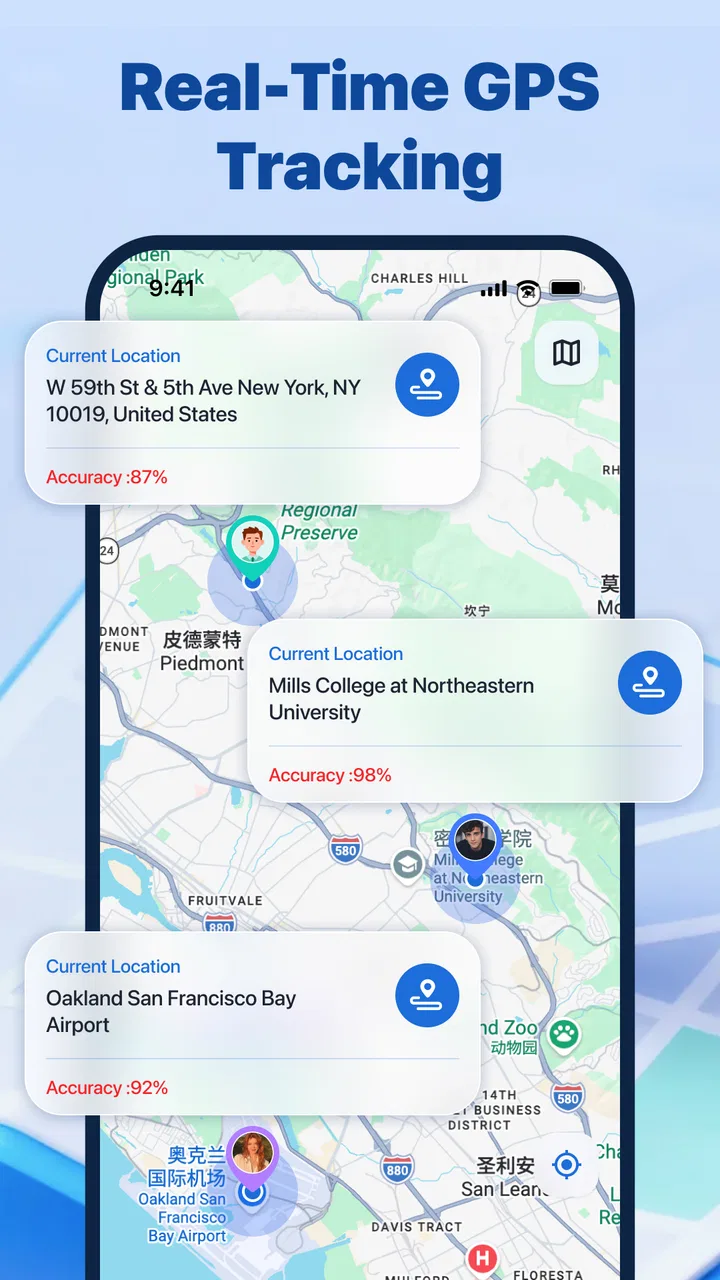
Friend Location is a Maps & Navigation app from MG-MagicSoftGaming, but I found its strength is coordination rather than route planning. It makes most sense when several people already know where they are going and need help staying connected along the way. At a crowded event, for instance, a shared location can cut down on repeated messages asking everyone to describe their position.
There is a trade-off in that convenience: a marker does not explain what a person intends to do next. If I were meeting friends at a busy venue, I would still send a short message such as “I’m by the north entrance.” Location gives context; ordinary conversation supplies the plan. Combining the two is more useful than asking the app to answer every question.
Reliability depends on the people as well as the app
A location display can seem more exact or current than it really is. Updates may not match every movement in real time, and a notification is not a guarantee that a recipient has seen it. I would use this as a layer of awareness for everyday coordination, not as a source of certainty for a time-critical decision.
There is a human side to reliability, too. If recipients are overwhelmed by alerts, they may stop paying attention; if sharing continues without a clear reason, the sender may feel watched. I would keep the group small, explain why each person is included, and agree when sharing is useful. Consent is not a setup detail to rush through; it is what makes the arrangement worth using.
Device limits and sensible backup plans
The current version is 1.0.4, and the app requires Android 7.0 or later. That makes it worth checking every participant’s phone before making the app part of a plan. If one person cannot use it, decide on a straightforward backup, such as a direct message or call, instead of assuming the group is covered.
Phone readiness matters just as much as compatibility. A location tool cannot make a phone with a drained battery or unavailable connectivity useful. Before depending on it for a trip, I would charge my phone, make sure the relevant people know the backup plan, and avoid treating a quiet screen as evidence that everything is fine.
From a location request to a useful outcome
I find the handoff most useful when the group agrees in advance what a location update should prompt: a quick check of the shared position, a direct message if plans seem unclear, or a call if concern grows. That turns a request into a practical routine without treating the map as a verdict. It also makes clear where the app’s role ends: people still decide what to do next.
Setting up the group with a clear purpose
My first recommendation is to decide on the use case before inviting anyone. “Share my location” can mean several different things: letting friends find one another at an event, helping relatives know that a traveler arrived, or giving a small group a way to react when somebody may need attention. Those situations should not be treated as identical. A group created for a one-time meeting should be handled differently from a standing safety circle.
That small planning step is one of the most useful ways to avoid friction with Friend Location. I would tell every participant exactly why they are being added and when they can expect location information to be relevant. This is especially important for less technical users. A person may accept an invitation without realizing that location sharing is intended for a particular journey or gathering, so a short conversation outside the app can prevent misunderstandings later.
The developer, MG-MagicSoftGaming, presents the product as a focused location-sharing utility rather than a broad travel platform. In my experience, that focus is helpful because it keeps the central task visible. You are not opening it to browse restaurants, compare routes, or explore a map layer. You are opening it because a trusted contact may need to know where you are or because you want to notice a safety update.
Moving from invitation to active sharing
Once the people are chosen, the next step is the handoff from the person who wants to be seen to the people who need to receive that information. This is where I would slow down instead of assuming that an invitation automatically creates a working safety arrangement. The sender should verify that the intended friends are the ones included, while recipients should understand what action they are expected to take when a notification appears.
A useful workflow is to test the arrangement before relying on it. For example, a family member preparing for an evening trip can share their position, ask another member to check whether it appears, and then confirm that the recipient knows how to respond if a safety notification arrives. This is not glamorous, but it exposes the most important weakness of any location tool: a feature can be present while the group still does not know how to use it under pressure.
I would also avoid treating the app as a substitute for a direct message. If I am meeting friends at a crowded venue, I can use the location view to reduce back-and-forth, but I would still send a clear message such as “I am at the north entrance.” A map can show a position without explaining intention, obstacles, or the next move. The best result comes from combining location context with ordinary communication rather than expecting one to replace the other.
How a realistic everyday handoff works
Imagine that I am traveling across town while a friend is waiting at the destination. I share my location with that friend before leaving, and the friend checks the app when my arrival becomes relevant. If a safety notification appears, the recipient has to decide whether to contact me, wait briefly, or ask another authorized person to help. The app supports the information handoff, but the people still provide the judgment.
That division of responsibility is easy to overlook. Friend Location can make a person’s whereabouts more visible, but it cannot decide whether a delay is harmless, whether a phone has lost connectivity, or whether someone needs immediate assistance. I see it as a useful layer between silence and a phone call, not as an emergency service. For serious danger, relying on an ordinary emergency channel is the safer choice.
The same workflow can help at a large public gathering. Instead of repeatedly asking friends to describe where they are, each person can use the shared location context to narrow the search. The trade-off is that everyone must be comfortable with the arrangement. A person who only wants to share briefly should not be left in a permanent group by accident, and the group should agree on when the activity is no longer needed.
What recipients should do with notifications
Notifications are only useful when they lead to a sensible next step. Before using the app for a trip or meetup, I would agree on a simple response pattern: check the person’s latest position, try direct contact if something looks unusual, and involve another trusted person when appropriate. This turns an alert from a vague interruption into part of a repeatable workflow.
There is also a human factor. A recipient who receives frequent updates may begin ignoring them, while a sender may feel watched if sharing continues without a clear reason. I would keep groups small and purposeful, especially for safety-related use. The app’s value comes from relevant awareness, not from putting every acquaintance into one permanent location circle.
Another practical tip is to keep the phone itself ready. A location-sharing app cannot compensate for a drained battery, disabled connectivity, or a device left behind. Before depending on it, I would charge the phone, check that the intended contacts are available, and make sure everyone knows what to do if the app stops updating. That preparation is more important than any single screen inside the application.
Where the workflow becomes less dependable
The main friction is that location information can be interpreted as more precise or more current than it really is. A displayed position may not reflect a person’s exact movement at every moment, and a notification may arrive later than expected. I would never use the app to make a time-critical decision that requires guaranteed live tracking. It is better suited to ordinary coordination and an additional safety check.
There is also a social limitation. The app works best when every participant agrees to the same boundaries. If one person is uncomfortable sharing, adding them anyway would damage trust and undermine the purpose of the group. Likewise, if a recipient does not check notifications, the sender may assume that somebody is watching when nobody actually is. The workflow breaks not only because of technology, but because of unclear expectations.
For navigation itself, I would still choose a dedicated maps application. A conventional navigation tool is stronger when I need turn-by-turn directions, traffic context, route alternatives, or a detailed search for places. Friend Location is more appropriate after the destination is known, when the problem is keeping people connected rather than finding the road. That makes it complementary to standard mapping instead of a full replacement.
Who will get the most from it
I can see this app fitting friends who regularly meet in busy places, relatives coordinating a journey, and small groups that want a straightforward way to share whereabouts with authorization. It is particularly sensible when the same people need occasional location awareness but do not want to build a complicated technical system around it. The free price also lowers the barrier for trying it with a trusted group.
It is less suitable for someone who expects a complete family-management platform, professional fleet monitoring, or highly detailed navigation. I would also skip it as the only safety measure for solo travel in a situation where a missed update could have serious consequences. In those cases, a more specialized service with clearly defined emergency procedures may be a better fit.
What the current release suggests about choosing it
The app is currently at version 1.0.4 and requires Android 7.0 or later, so compatibility is worth checking before a group makes plans around it. That requirement covers many older devices, but not every phone still in use. If one participant cannot install it, the group should decide on an alternative communication method rather than leaving that person outside the workflow.
Its public reception is mixed, with a 3.3 average from around 279 ratings and roughly 42 written reviews. I read that as a reason to approach it with realistic expectations rather than as an automatic rejection. The product has reached over 100K installs, which suggests that the basic idea is understandable to a meaningful number of users, but the modest average also reminds me to test the complete handoff with my own group.
That test should include more than opening the map. I would check whether each intended participant can join, whether the right person receives the relevant update, and whether everyone understands what happens next. If the group cannot agree on those steps, no amount of convenience will make the arrangement dependable.
My practical verdict after following the full flow
Friend Location succeeds when the desired outcome is modest and clear: authorized friends should be able to share whereabouts and receive safety-related awareness without turning the task into a complicated planning exercise. I like the directness of that concept. It can reduce repetitive “where are you?” messages and give a group a shared point of reference during a meetup or journey.
Its limitations are equally important. The app does not remove the need for consent, communication, battery awareness, or human judgment. A location marker is useful context, not proof that somebody is safe, available, or moving toward the expected destination. Notifications should prompt a check-in, not create false confidence.
My recommendation is to use it as a small, trusted-group coordination tool, not as a complete emergency solution. Install it when you want a free way to organize location sharing with friends and can agree on clear boundaries. Choose a conventional navigation app when directions are the priority, and choose a more specialized safety service when guaranteed response procedures matter. Used within those limits, this Maps & Navigation app from MG-MagicSoftGaming can be a practical addition to everyday plans, especially when the people involved test the workflow before they actually need it.
FAQs for Friend Location: Phone Tracker
01What is Friend Location: Phone Tracker used for?
Friend Location: Phone Tracker is designed to help you share and view the real-time location of friends or family members, provided they give permission. It can be useful for coordinating meetups, checking whether someone has arrived safely, or keeping track of a group during trips and outdoor activities. The exact tools may vary by device and app version, so review the in-app options before relying on it.
02Does Friend Location: Phone Tracker require permission to access my location?
Yes. Location tracking normally requires permission from the device owner, and other people should not be visible unless they have knowingly agreed to share their location. Depending on the features you use, the app may also request access to notifications, contacts, or background location services. You can manage these permissions in Android or iOS settings, although restricting them may limit tracking accuracy or availability.
03Can I track someone without them knowing?
A legitimate location-sharing feature should not be used to secretly monitor another person. Friend Location: Phone Tracker is intended for consent-based sharing between people who understand when their location is visible and who can access it. Before creating a tracking group or sending an invitation, make sure everyone agrees. Attempting to bypass permissions or install tracking tools without consent can violate privacy expectations and local laws.
04How accurate is the location shown by Friend Location: Phone Tracker?
Location accuracy depends on GPS signal strength, Wi-Fi and mobile network coverage, device settings, battery-saving modes, and whether the app is allowed to run in the background. Outdoors with a clear signal, the position may be fairly precise, while indoor locations can appear delayed or approximate. It is best treated as a convenience and safety aid, not as a guaranteed live position or emergency service.
05Does Friend Location: Phone Tracker affect battery life or use mobile data?
Regular location updates can consume more battery than ordinary apps, especially when background tracking, high-accuracy GPS, or frequent refreshes are enabled. The app may also use mobile data when updating positions away from Wi-Fi. To reduce usage, share locations for limited periods, lower update frequency where possible, and check your phone’s battery and data settings. Features and consumption can differ between Android and iOS.
Pros
- Simple interface makes location sharing easy to set up.
- Useful for coordinating meetups with friends and family.
- Location updates can help during travel or outdoor activities.
- Supports quick checking of a contact’s shared location.
- May provide reassurance when monitoring loved ones with consent.
Cons
- Requires continuous location access
- which can affect battery life.
- Accuracy may drop indoors or in areas with weak GPS signals.
- Some features may require a subscription or in-app purchases.
- Location sharing raises privacy concerns if permissions are misused.
- Both users may need the app and an active internet connection.

Friend Location: Phone Tracker
Gallery